Using the wrong dimensions can hurt your social media reach and engagement, so to help you, we have put together a guide to using the correct image sizes for the various platforms you are likely to use.
If you haven’t got any other work to add to your plate, social media platforms seem to just love to make things more difficult for us by changing preferred image sizes, a lot! And unfortunately for use, using the wrong dimensions can hurt your reach and engagement.
This guide covers the current (at time of publishing) image size requirements for every major social platform in 2026.
Quick look at social media image sizes
We go into more detail for every single network below, but this image includes the social media image sizes you probably look up most often.
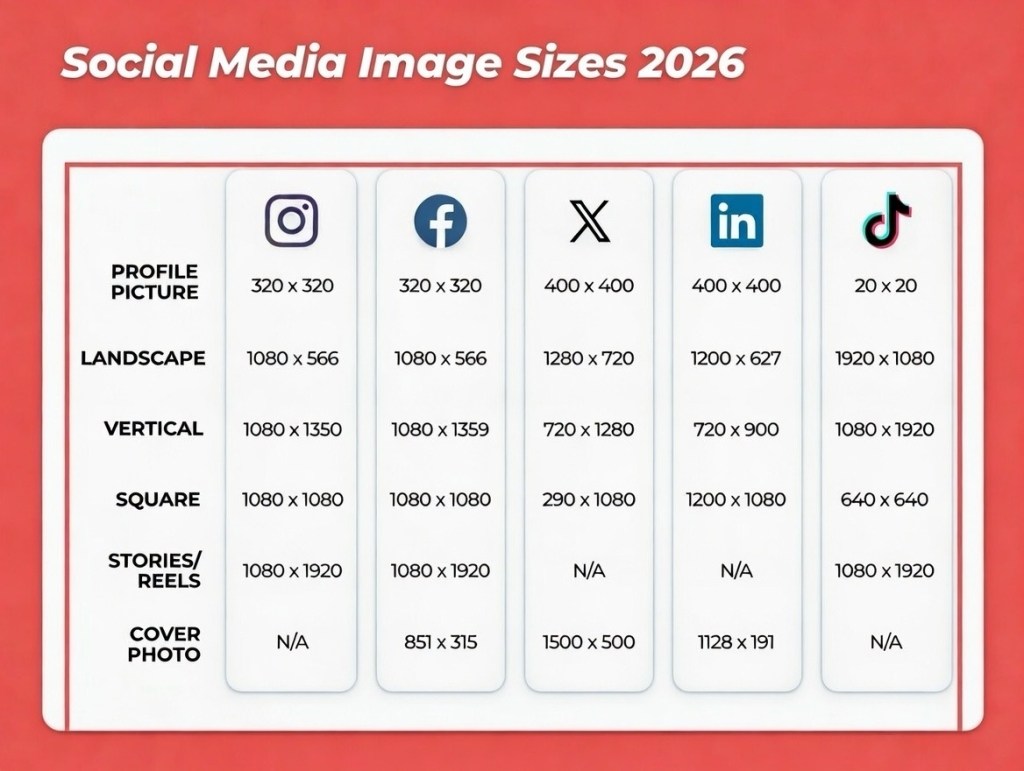
Basic Instagram image sizes
- Profile photo: 320 x 320 px
- Landscape: 1080 x 566 px
- Vertical: 1080 x 1350 px
- Square: 1080 x 1080
- Stories and Reels: 1080 x 1920
Basic Facebook image sizes
- Profile photo: 196 x 196 px
- Landscape: 1080 x 566 px
- Vertical: 1080 x 1359 px
- Square: 1080 x 1080 px
- Stories and Reels: 1080 x 1920 px
- Cover photo: 851 x 315 px
Basic X (formerly Twitter) image sizes
- Profile photo: 400 x 400 px
- Landscape: 1280 x 720 px
- Vertical: 720 x 1280 px
- Square: 720 x 720 px
- Cover photo: 1500 x 500 px
Basic LinkedIn image sizes
- Profile photo: 400 x 400 px
- Landscape: 1200 x 627 px
- Vertical: 720 x 900 px
- Square: 1200 x 1200 px
- Cover photo size: 1128 x 191 px
Basic TikTok image sizes
- Profile photo: 20 x 20 px
- Landscape (ad): 1920 x 1080 px
- Vertical: 1080 x 1920 px
- Square (ad): 640 x 640 px
- Stories: 1080 x 1920 px
Instagram image sizes
Instagram supports horizontally and vertically oriented images well as square images. Well, sort of. You can still use all of these photo orientations in your posts, and that’s how they’ll appear in the Instagram feed. But they will all be displayed with a vertical crop on your Instagram grid.
This makes image dimensions a little tricky to get right, especially if you want to control the look of your grid as a cohesive whole. Follow these guidelines to make sure your images end up looking their best.
Instagram profile picture size: 320 x 320 pixels
Instagram profile photos are displayed at 110 x 100 pixels, but the image files are stored at 320 x 320 pixels, so make sure to upload an image that’s at least that big.
Even though the dimensions are in a square format, Instagram profile photos are displayed as a circle. Make sure any elements you want to focus on in the photo are centered so they don’t get cropped out.
Instagram post sizes:
- Landscape image: 1080 x 566 pixels (feed) / 1012 x 1350 (grid)
- Vertical image: 1080 x 1350 pixels (feed) / 1012 x 1350 (grid)
- Square image: 1080 x 1080 pixels (feed) / 1012 x 1350 (grid)
- Carousel images: 1080 x 1350 pixels (feed) / 1012 x 1350 (grid)
- Supported aspect ratios: Anywhere between 1.91:1 and 4:5 (feed) / 3:4 (grid)
- Recommended image size: Width of 1080 pixels, height between 566 and 1350 pixels
Tips:
- If you want your images to look their best on Instagram, aim to upload an image that is 1080 pixels wide.
- When you share an Instagram image that’s sized over 1080 pixels, Instagram will size it down to 1080 pixels.
- If you share a photo that has a resolution lower than 320 pixels, Instagram will size it up to 320 pixels.
- If your image is between 320 and 1080 pixels wide, Instagram will keep that photo at its original resolution, “as long as the photo’s aspect ratio is between 1.91:1 and 4:5 (a height between 566 and 1350 pixels with a width of 1080 pixels).”
- If you upload an image using a different ratio, the platform will automatically crop your photo to fit a supported ratio.
- Remember that all photos appear in vertical format on your grid.
Instagram Stories image size: 1080 x 1920 pixels
- This is an aspect ratio of 9:16.
- The “safe area” is 1080 x 1610 pixels. Make sure to keep important content within that area of the frame.
Instagram Reels sizes:
- 1080 x 1920 pixels (feed) / 1080 x 1440 pixels (grid)
- The feed aspect ratio is 9:16, while the grid view is 3:4.
Instagram ads image sizes:
- Landscape: 1080 x 566 pixels
- Vertical: 1080 x 1350 pixels
- Square: 1440 x 1440 pixels
- Minimum width: 500 pixels
- Minimum height: 400 pixels
- Supported aspect ratios: Anywhere between 1.91:1 and 4:5
Image size for Instagram Stories ads: 1440 x 2560 pixels
- This is a 9:16 ratio.
- Instagram recommends leaving roughly “14% (250 pixels) of the top and 20% (340 pixels) of the bottom of the image free from text, logos, or other key creative elements” to prevent them from being covered.
Instagram Reels ads size: 1440 x 2560 pixels
- This is a 9:16 ratio.
Instagram recommends leaving roughly “14% of the top, 35% of the bottom, and 6% on each side… free from text, logos, or other key creative elements” to prevent them from being cropped or covered.
X (f.k.a. Twitter) image sizes
With its new video tab, X is clearly embracing a multimedia experience on the platform. Adding images to your X posts can help you stand out from the crowd.
Pssst: This isn’t a video size post, but we will tell you that the recommended aspect ratio for the new X video tab is 9:16 with a minimum resolution of 720 x 1280.
X (Twitter) image sizes for profile photos: 400 x 400 (recommended)
- Maximum file size: 2 MB.
X header photo size: 1500 x 500 pixels (recommended)
- The way header images display changes depending on the monitor and browser being used. Even with the recommended dimensions, 60 pixels can be cropped from the top and bottom.
X images sizes for in-stream photos:
- Landscape image: 1280 x 720 pixels
- Vertical image: 720 x 1280 pixels
- Square image: 1080 x 1080 pixels
- GIF: 1280 x 1080 pixels
Tips
- Recommended aspect ratio: 16:9 or 1:1
- Supported formats: GIF, JPG and PNG
- Maximum file size: Up to 5MB for photos and GIFs on mobile. Up to 15MB on the web.
X image sizes for ads:
- Image ad with app buttons, website buttons, or polls: 800 x 418 pixels (1.91:1) or 800 x 800 (1:1) pixels. Square images in ads with polls will crop to 1.91:1 in mobile timeline.
- Image ad with conversation buttons: 800 x 418 pixels (1.91:1).
- Standalone image ads: 1200 x 1200 pixels (1:1) or 1200 x 628 pixels (1.91:1).
- Carousel image ads: 800 x 418 pixels (1.91:1) or 800 x 800 (1:1) pixels. All images in the carousel must use the same aspect ratio.
- Collection ads: 800 x 800 pixels (1:1), max 3 MB.
Facebook image sizes
Facebook is a tricky platform, because image sizes differ from desktop to mobile, and Facebook users are inclined to use both. We’ve got you covered on both fronts here.
Facebook profile picture size: 320 x 320 pixels (recommended)
- Display size desktop: 176 x 176 pixels.
- Display size smartphone: 196 x 196 pixels.
Image sizes for Facebook cover photo: 851 x 315 pixels (recommended)
- Display size desktop: 820 x 312 pixels
- Display size smartphone: 640 x 360 pixels
- Minimum size: 400 x 150 pixels
- Ideal file size: Less than 100KB
Tips
- To avoid any compression or distortion, upload a JPG or PNG file.
- Use the recommended pixel sizes for the fastest load times.
- Profile pictures and cover photos with logos or text work best when uploaded as a PNG file.
- Don’t drag to reposition once you’ve uploaded your cover photo.
Facebook timeline photo and post sizes:
- Landscape image: 1080 x 566 pixels (1.91:1)
- Vertical image: 1080 x 1359 pixels (4:5)
- Square image: 1080 x 1080 pixels (1:1)
Facebook image sizes for Facebook Stories: 1080 x 1920 pixels (recommended)
- Facebook Stories take up the full screen of a phone. That’s an aspect ratio of 9:16.
- Max file size is 30 MB.
Image sizes for Facebook ads:
- Facebook Feed ad: 1440 x 1440 pixels (1:1) or 1440 x 1800 pixels (4:5). Minimum size 600 x 600 pixels. Maximum file size of 30 MB.
- Facebook Search: At least 1080 x 1080 pixels. Ratio 1.91:1 to 1:1. Maximum file size of 30 MB.
- Facebook Marketplace image ads: Minimum 1080 x 1080 pixels (1:1). Maximum file size of 30 MB.
- Sizes for Facebook Right Column ads (desktop only): At least 1080 x 1080 pixels. Ratio 1:1.
Image size for Facebook Stories ads: 1440 x 2560 pixels
- This is a 9:16 ratio.
- Maximum file size 30 MB.
- Facebook recommends leaving roughly “14% (250 pixels) of the top and 20% (340 pixels) of the bottom of the image free from text, logos, or other creative elements” to prevent them from being covered.
Facebook Reels ads size: 1440 x 2560 pixels
- This is a 9:16 ratio.
- Facebook recommends leaving roughly “14% of the top, 35% of the bottom, and 6% on each side … free from text, logos, or other key creative elements” to prevent them from being cropped or covered.
LinkedIn image sizes
Just to keep things spicy, LinkedIn switches some image sizes up between personal profiles and company pages. You’ll find them all here.
LinkedIn image sizes for personal profiles:
- LinkedIn profile photo: 400 x 400 pixels or larger (recommended). Maximum 7680 x 4320 pixels or 8MB.
- Cover photo: 1584 x 396 pixels (recommended). Aspect ratio: 4:1. Maximum 8 MB.
Tips
- Cover photos are cropped differently on mobile and desktop. Make sure to view your profile on both kinds of display before finalising.
LinkedIn image sizes for Company Pages:
- Company logo size: 400 x 400 pixels
- Page cover image size: 1128 x 191 pixels
- Life tab main image size: 1128 x 376 pixels
- Life tab custom modules image size: 502 x 282 pixels
- Life tab company photos image sizes: 900 x 600 pixels
Image size for LinkedIn post with URL: 1200 x 627 pixels (recommended)
- Minimum width: 200 pixels
LinkedIn image sizes for ads:
- Landscape (desktop and mobile): 1200 x 628 pixels (recommended). Minimum 640 x 360 pixels. Maximum 7680 x 4320 pixels. Max file size 5 MB.
- Square (desktop and mobile): 1200 x 1200 pixels (recommended). Minimum 360 x 360 pixels. Maximum 1200 x 1200 pixels. Max file size 5 MB.
- Vertical (mobile only): 720 x 900 pixels (recommended). Minimum 360 x 640 pixels. Maximum 2430 x 4320 pixels. Max file size 5 MB.
- Carousel: 1080 x 1080 pixels. 2 to 10 images. Max file size 10 MB.
Pinterest image sizes
Pinterest profile image size: 280 x 280 pixels (recommended)
- Remember that your profile photo will be displayed as a circle.
Pinterest image size for profile cover photo: 800 x 450 pixels ( minimum)
- This is a 16:9 aspect ratio.
Pinterest image sizes for Pins:
- Recommended size: 1000 x 1500 pixels.
- Recommended aspect ratio: 2:3. Other available ratios are 9:16, 3:4, 4:5, and 1:1.
- Max file size: 20 MB for web, 1 GB recommended for app.
Tips
- Stay within the safe zone to make sure your content is fully visible on any device: top 270 px, left 65 px, right 195 px, bottom 790 px.
Pinterest image sizes for collections Pins:
- Aspect ratio: 1:1 (recommended) or 2:3
- Recommended size: 1000 x 1000 pixels or 1000 x 1500 pixels
- Max file size: 10MB
Tips
- This format appears as one main image, above 3 to 24 smaller images.
- The main image’s ratio can differ from the smaller images, but all the smaller images must have the same aspect ratio.
- Collections appear in feeds on mobile devices.
- 1:1 format is recommended. If you choose a different aspect ratio, know that these Pins are cropped from the middle.
- Collections can also be an ad format on Pinterest.
Pinterest image sizes for ads:
- Image and Shopping ads: 1000 x 1500 pixels (recommended). Aspect ratio 2:3 (recommended). Max file size 20 MB.
- Carousel ads: 1000 x 1500 pixels (2:3) or 1000 x 1000 pixels (1:1) recommended. Up to 5 images.
YouTube image sizes
YouTube profile photo size: 800 x 800 pixels (recommended)
Tips
- Make sure the focus of your photo is centred for best results.
- Maximum file size is 15 MB.
- Photos will render at 98 x 98 pixels.
YouTube banner image size: 2560 x 1440 pixels (recommended)
- Aspect ratio: 16:9
- Minimum dimensions 2048 x 1152
- At the minimum dimensions, the safe area for text and logos to avoid being cut off is 1235 x 338 pixels
- Maximum file size: 6 MB
YouTube video thumbnail size: 1280 x 720 pixels (recommended)
- Minimum width is 640 pixels
- Max file size is 2 MB
- Use a 16:9 aspect ratio
YouTube podcast playlist thumbnail size: 1280 x 1280 pixels (recommended)
- Use a 1:1 aspect ratio
- Maximum file size: 10 MB
Tips
- You can’t upload a custom thumbnail for Shorts, but you can select which frame from the video to use as the thumbnail.
TikTok image sizes
TikTok profile photo size: 200 x 200 (recommended)
- The minimum upload size is 20 × 20 pixels
- We recommend uploading a higher quality photo for future-proofing.
TikTok video size: 1080 x 1920 (recommended)
- The ideal aspect ratio for vertical TikTok videos is 9:16. You can post videos with other dimensions, but the platform will add black bars to the top and bottom of the videos so they are full-screen.
TikTok carousel size: 1080 x 1920 (recommended)
- The ideal aspect ratio for TikTok carousel posts is 9:16. While 1:1 (square) and 4:5 (portrait) also work, they may not fill the screen on mobile.
TikTok ads image sizes:
- Vertical (recommended): 540 x 960 pixels minimum (9:16)
- Landscape: 960 x 540 pixels minimum (16:9)
- Square: 640 x 640 pixels minimum (1:1)
- Carousel: 1080 x 1920 pixels (recommended). Supported sizes include 1200 x 628, 720 x 1280, and 640 x 640 pixels. Up to 35 images. Recommended max file size 100 KB.
- Profile photo for ads: 98 x 98 pixels (1:1). Max file size 50 KB.
Why is it important to get social media image sizes right?
Social media marketers need to get many things right when creating visual content for social media.
You’ve got to make sure the images you use comply with copyright laws. If you don’t have original imagery, you’ve got to find high-quality stock photos. And you’ve got to figure out how to create images that connect with your audience and inspire them to take action.
On top of that, you’ve got to get your social media image sizes right. That’s really important because:
- It avoids pixelation and awkward image stretching to keep your images looking professional.
- Photos optimised for each social channel’s feed can help increase engagement.
- Incorrect sizing could cut off some of your brand’s messaging.
- It can future-proof your content. Using the right social media image sizes now could mean less work for your brand in the future, when networks change up how images display yet again.
FAQ: Social media image sizes
What are the correct social media image sizes for each platform in 2026?
The correct social media image sizes in 2026 depend on the platform and where the image appears. However, a width of 1080 pixels is still the most common standard, with 4:5 and 9:16 aspect ratios working best on mobile-first platforms.
What image sizes should brands use on Instagram, Facebook, LinkedIn, and X?
Brands should use 1080 x 1350 pixels for vertical feed posts, 1080 x 1080 pixels for square images, and 1080 x 1920 pixels for full-screen formats across Instagram and Facebook.
On LinkedIn, 1200 x 1200 pixels works well for feed images and 1200 x 627 pixels for link previews. On X, square and landscape images perform best, with 1:1 and 16:9 formats being the safest options.
How often do social media image sizes change, and how should teams keep up?
Social media image sizes change gradually, but small updates happen every year as platforms adjust layouts and feeds. Teams can keep up by following platform updates and using publishing tools like Hootsuite that stay current with size recommendations.
How do enterprises standardise image sizes across multiple platforms?
Enterprises standardise image sizes across multiple platforms by designing templates, setting approved aspect ratios, and using shared tools to resize images for each platform. This approach keeps content consistent and optimised across social media platforms.
What happens if you use the wrong image size on social media?
Using the wrong image size can lead to cropping, compression, or empty space around your visuals. Important text or logos may get cut off, and engagement can drop as a result.

 MB Media Global
Leave a comment